Windows 10 & 11
Your iPhone photos and messages, safely on your own PC.
Back up photos, videos and iMessages over USB.
No cloud. No subscription. You keep everything.
46 MB · Windows 10 & 11 · 64-bit
SkyXone is a Windows app — email yourself this link and open it on your PC.
- Free trialNo account
- No subscriptionPay once, yours
- 100% yoursStays on your PC
The problem
-
iCloud storage full
You run out of space and get asked to pay more every month.
-
Phone full of photos
You can’t take more photos or videos because storage is full.
-
Messages you can’t get
iMessages stay on the phone. You can’t save or search them.
How it works
- 1
Plug in your iPhone
Connect with a USB cable. SkyXone detects your device.
- 2
Choose what to back up
Pick photos, messages, or both. Choose how your files are organized.
- 3
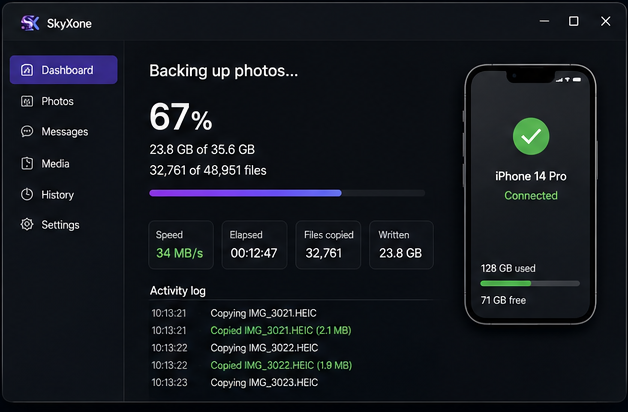
Watch it copy
See live progress. Keep using your PC while it works.
34 MB/s over USB — about 40 GB in roughly 20 minutes.
Everything you need, nothing you don’t
Photo & video backup over USB
Pick your folder layout: one flat folder, Apple’s original camera-roll folders, or sorted by date such as
2026\2026-08.iMessage export
Browse conversations as HTML pages that look like the Messages app. Also exports to CSV.
Clear photos after backup optional
Each photo is removed only after its PC copy is verified byte-for-byte. Works even with iCloud Photos sync on, and Live Photos are never half-deleted.
Never copies the same photo twice
SkyXone remembers what you already have, including drives that are currently unplugged.
Survives a full disk
Stops cleanly, shows what’s left, and continues on another drive without copying the same files again.
Keeps going when the screen locks
If the phone locks mid-backup, SkyXone waits and resumes instead of failing.
Message media organized
Photos, videos, audio and documents from chats are pulled out and sorted by contact or by type.
Live progress
Percentage, files completed, GB written, transfer speed, elapsed time and an activity log.
No driver hassle
The installer detects the Apple Devices app or iTunes and skips the driver step if it’s already installed.
iMessage export that actually looks right
Conversations become clean HTML pages that look like the Messages app, with your contacts matched by name from the phone.
Also export to CSV for spreadsheets.
Try it free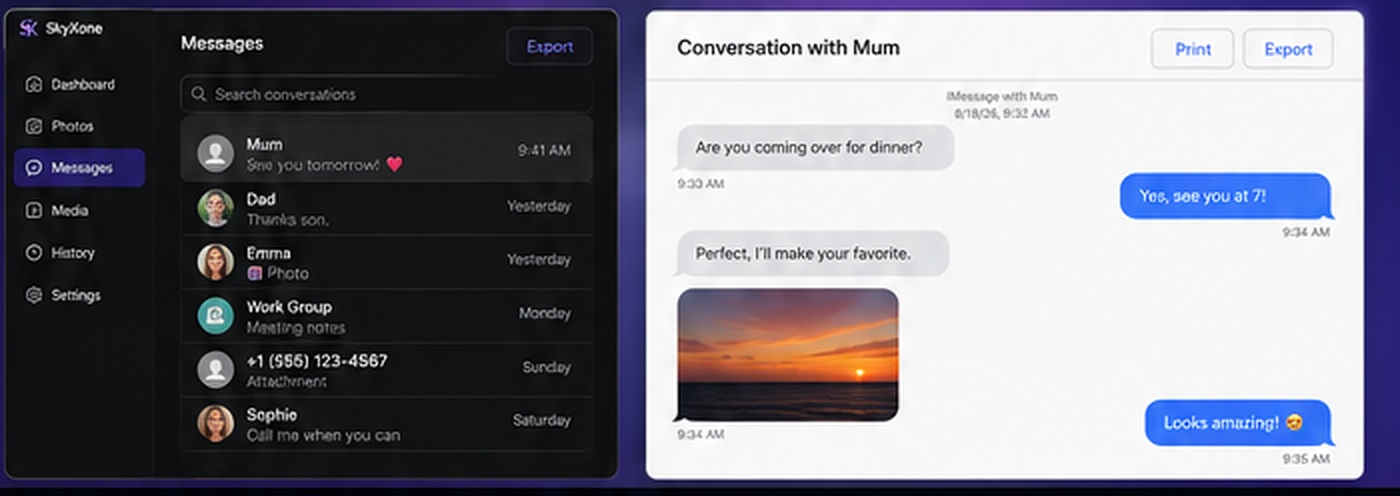
Simple pricing. Choose what’s right for you.
Lifetime costs $49 once. Unlike popular alternatives, this is not a subscription you must keep paying to keep using the files you already backed up.
-
Personal
$29/ year
- 2 PCs
- 1 year of updates
-
MOST POPULAR
Lifetime
$49one-time
- 3 PCs
- Pay once, yours forever
-
Family
$79one-time
- 5 PCs
- Use within the same household
-
Business
$199/ year
- 25 PCs
- Priority support
Your key is emailed within a minute of paying, and it is also waiting in your account along with your plan and receipts. Payments are processed securely by Helcim — your card statement will show WE NAILS.
Try free. No time limit.
- Photo backups: up to 50 items per run
- Message export: disabled in the trial
- No account. No credit card.
- Enter a licence key to unlock everything instantly
46 MB · Windows 10 & 11
Getting your licence
- 1
Buy — the key arrives by email within a minute.
- 2
Open SkyXone and choose “I have a key”.
- 3
Enter the same name and email you used at checkout, then paste the key.
A licence can be moved: release it on one PC and activate it on another.
Frequently asked questions
Is it safe? Does anything leave my PC?
Nothing leaves your PC. SkyXone copies straight from the iPhone over the USB cable to a folder you choose. There is no cloud service and no account.
Does it work on Mac?
No. SkyXone is Windows 10 and 11 only.
Does it need internet?
Only to buy and activate. Backups themselves work with no internet at all.
Does it need Apple software?
The free Apple Devices app or iTunes is required for the iPhone driver. The installer links to it, and skips the step if it’s already installed.
What happens when my licence expires?
Files you already backed up remain yours forever. A Lifetime or Family licence never expires.
Does it work with iCloud Photos on?
Yes. The optional photo-clearing feature works even when iCloud Photos sync is on.
What happens when photos are deleted from my phone?
Photos are only cleared after their copy on your PC is verified. They move to Recently Deleted on the iPhone and are recoverable for 30 days.
How does the first message backup work?
The first message backup is a full device backup. It can take a while and use tens of GB. Later runs are incremental and much faster.
What are the system requirements?
Windows 10 or 11, 64-bit. The download is 46 MB. You also need a USB cable and the Apple device driver described above.
What is your refund policy?
See our refund policy for full details, or email support@skyxone.com.